
Overview
Duration:
2 sprints (approx. 4 weeks)
Main Contributor:
Faisal Islam - Product Designer
Core Contributors:
Darragh Byrne - Product Manager
Dreama Jain - Engineering Manager
Project Type:
UX + Product Strategy Alignment
My role as a Product Designer:
- Synthesized business objectives with user needs, facilitated workshops, and defined measurable, user-centric success criteria.
- Analyzed user pain points and stakeholder insights to articulate a focused problem statement and link the initiative to business and engagement outcomes.
- Bridged the connection between business outcomes and user insights to secure buy-in from Product and Engineering leaders in our domain triad.
- Led user research and behavioural analysis to create evidence-based personas, informing design decisions.
- Translated personas into end-to-end journey maps and interaction flows, identifying friction points and high-impact design opportunities.
- Aligned with key teams regularly to identify + mitigate risks, build key relationships, prioritize features, assess feasibility, and build consensus on focus areas.
- Partnered with product and data teams to define KPIs, phased delivery plans, and success tracking for iterative validation.
The real impact of UX is when users walk away thinking:
“This product makes my life easier, and I trust it.”
Vision & Strategic Goals
My Role: I shaped the vision by synthesizing business objectives with user needs and facilitating workshops to align stakeholders. I then translated ambitions into a clear design vision and measurable goals that guided decision-making.
Result: We set clear goals: increase recognition activity by 20%, reduce drop-off in flows by 35%, focus on manager-driven engagement and achieve feature parity in chat integrations via MFE (Micro Front End).
Vision:
Seamlessly embed recognition and engagement workflows into the communication tools employees already use - making interactions frictionless, reliable, and ultimately more frequent.
Strategic Goals:
- Increase active recognition interactions by 20% via chat integrations within 12 months.
- Reduce user drop-off during recognition flows by 35% through simplified, in-app experiences.
- Improve manager-driven engagement actions (e.g., team shoutouts, live recognitions) by 30%.
- Achieve feature parity with core platform using MFEs in chat environments.
Problem Space
My Role: I worked to clearly define the problem by analyzing user pain points and platform gaps. Through stakeholder interviews and early user feedback, I reframed broad challenges into a focused statement that highlighted both the engagement and alignment issues. This allowed the team to rally around a problem we could actually solve.
How might we design chat integrations that boost employee engagement without adding friction, while staying aligned with Achievers’ platform strategy.
Key questions addressed in this study:
• Why are we doing this, and what outcomes do we want?
• What are competitors doing, and how do we compare?
• Who should we focus on to achieve our goals?
• How do we get there?
Why are we doing this?
My Role: I connected the work back to purpose by articulating why chat integrations mattered to both employees and the business. I framed the initiative as a way to reduce friction in recognition while reinforcing Achievers’ broader engagement strategy. This gave stakeholders clarity on the value of investing in design.
Result: Streamlined integrations improve user engagement, simplify workflows for managers, and reduce engineering overhead by establishing a repeatable model.
The integration of chat apps like Microsoft Teams into the Achievers platform aims to:
- Help the platform meet core business goals.
- Increase engagement and monthly active users (MAU) beyond what web and mobile apps can achieve alone.
Stakeholder Insight:
- A key question emerged in early meetings: Are chat integrations part of the same ecosystem, or are they simply gateways to redirect users to the core app?
- The team concluded: "A win is a win, whether it's through an integration or on the platform."
Competitive Landscape
My Role: I conducted a competitive scan of direct and best-in-class recognition platforms to understand patterns and best practices. I synthesized findings into opportunities for differentiation, making it clear where Achievers could stand out while still meeting user expectations.
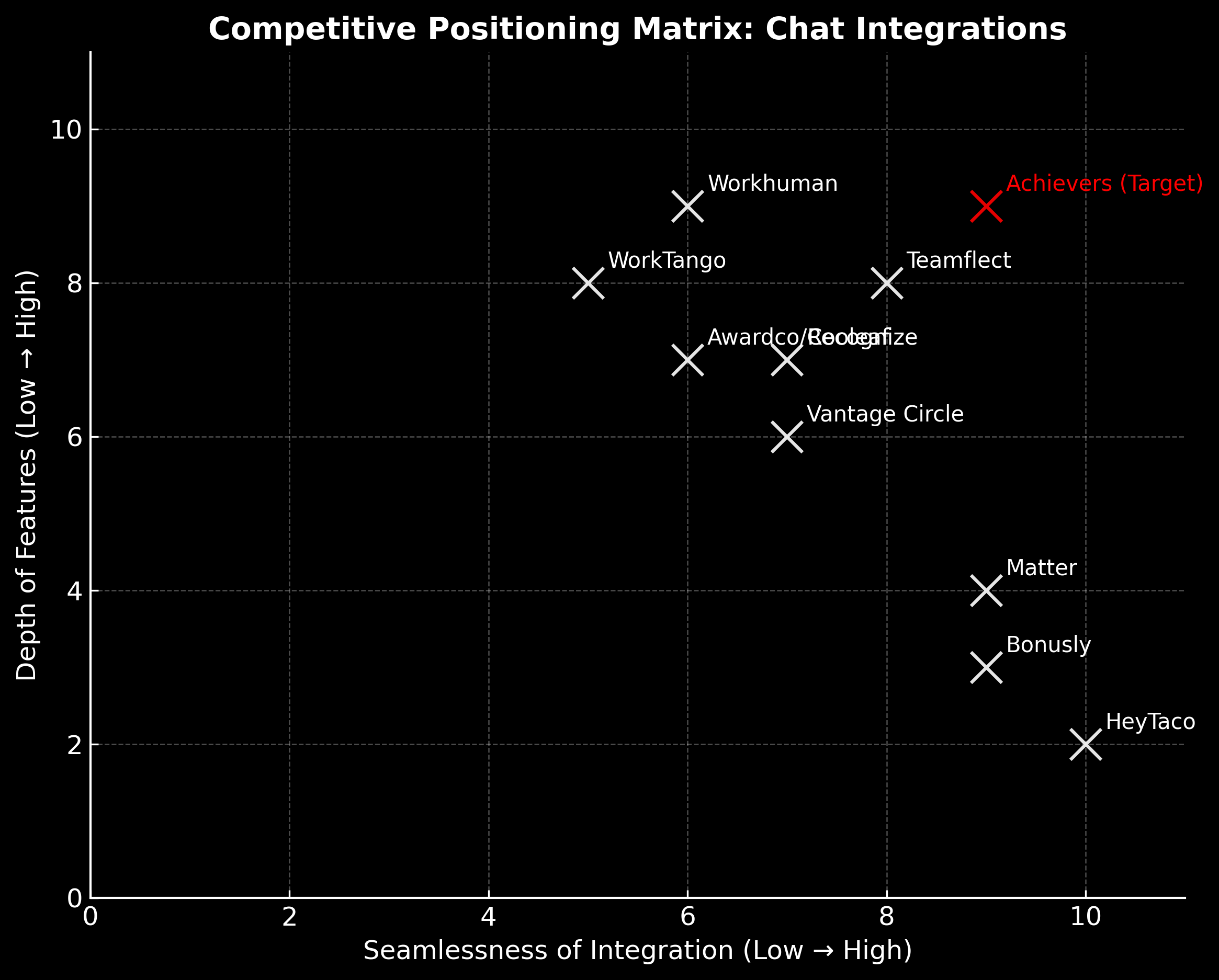
Result: Competitors ranged from lightweight tools with seamless but shallow integrations, to enterprise tools with depth but clunky UX. The gap: a solution that combines both without over-engineering.
Synthesis: Integration Experience Trends
Lightweight-first tools (Matter, HeyTaco, Bonusly): Fun and quick, but shallow integrations (often lack end-to-end flow).
Enterprise-first tools (Workhuman, WorkTango, Recognize, OC Tanner): Richer capabilities, but often clunky and redirect-heavy. Most of them, especially OC Tanner, are investing heavily in making their integrations more end-to-end to integrate into the user's daily workflow.
Teams-native (Teamflect): Strongest seamless experience, though their user experience can feel dense and over-engineered.
Where Achievers Can Differentiate
Deliver a true end-to-end flow (recognize → balance → redeem) inside Teams without pushing users to the web app for the users with high impact.
Balance enterprise needs (depth, reporting, manager tools) with lightweight UX (AI-powered recognition drafts, one-click redemption).
Harness the power of MFEs + AI (Copilot) to make the experience dynamic, personalized, and always up to date.
Risks
My Role: I helped stress-test our ideas by mapping risks across adoption, disengaged personas, and technical blockers like MFEs. I facilitated discussions with cross-functional partners to prioritize mitigations, ensuring our strategy remained both feasible and impactful.
Challenges: Initially, there was pushback on implementing MFEs due to the engineering effort involved. However, after presenting the vision of a seamless chat experience—which would also reduce future maintenance overhead—the engineering manager recognized the value and agreed to prioritize developing MFEs for MS Teams which could later be applied to all chat integrations.
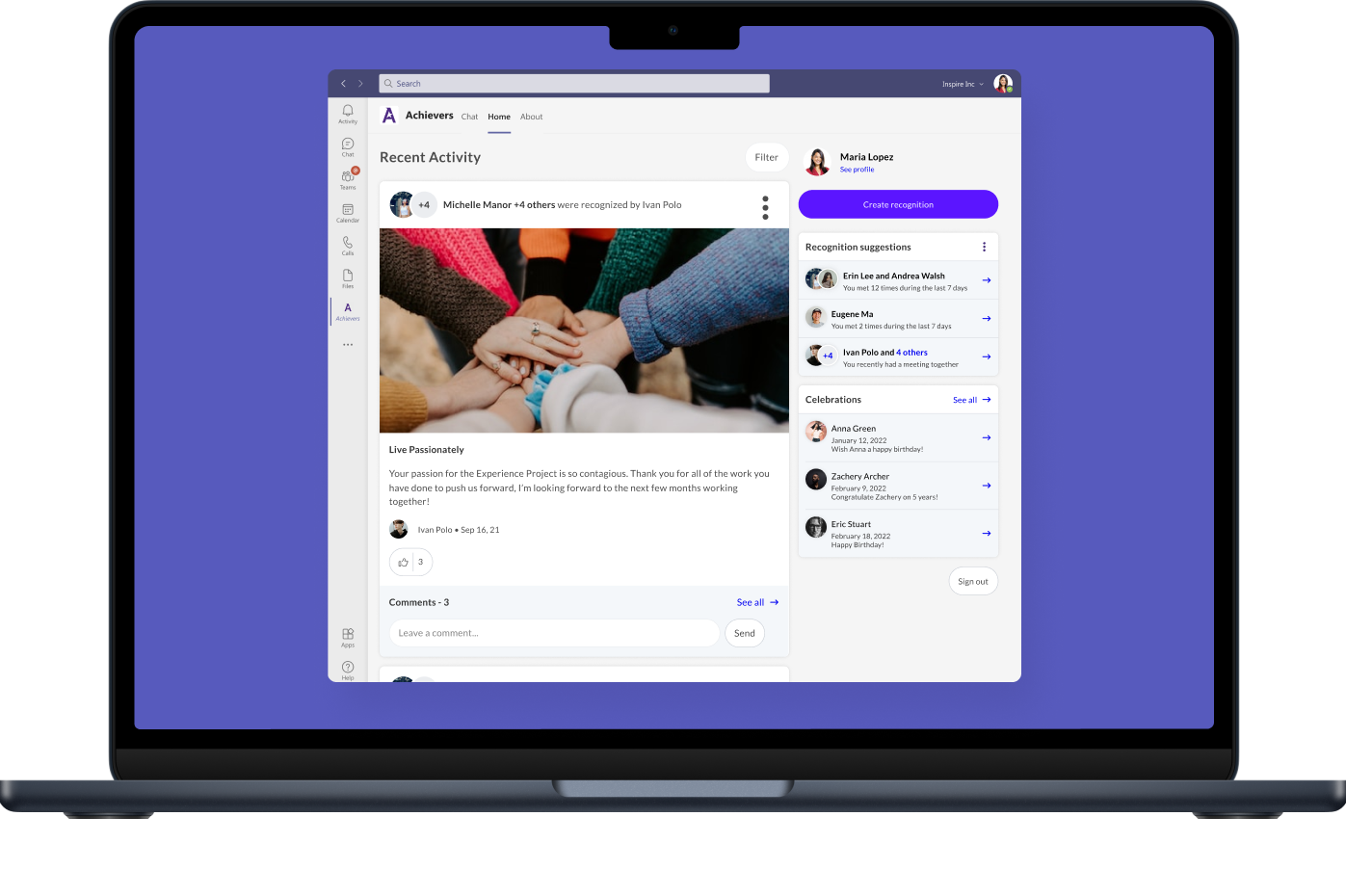
Without MFEs, each build of the newsfeed on Microsoft Teams was isolated—making it harder to maintain design consistency and a seamless user experience.
1) Micro Frontends (MFEs): Without MFEs most of improvements to chat integrations weren’t possible—features were siloed, inconsistent, and difficult to scale.
Mitigation: Aligned early with key teams to prioritize MFEs as a foundation before tackling higher-level features.
Result: Created a scalable technical base, reducing future rework and enabling end-to-end recognition flows directly inside MS Teams.
2) Adoption friction: Users abandoning the integration if it felt confusing or disruptive. Disengaged employees wouldn’t change behaviour just because flows were faster, and managers like Jessica needed tools that were simple and visible.
Mitigation: Keep flows lightweight, embed prompts naturally in chat, focus on manager workflows, and roll out incrementally starting with Microsoft Teams.
Result: This reduced the risk of building features that looked good on paper but failed in practice.
3) Overinvesting in lower-impact features: Disengaged employees require a mindset shift, not just smoother flows. Over-investing in features for them risked high effort with low impact.
Mitigation: Prioritize managers where influence is greater, using toolkits, digests, and prompts to amplify recognition.
Result: Ensured design and development effort created meaningful engagement instead of chasing low-return solutions.
User Research & Personas
My Role: I led persona creation by analyzing research and behavioural data I gathered, with the help of the research tool Dovetail and our data science team, to capture real motivations and blockers. Customer Success teams were also consulted to get a pulse of which painpoints they hear about the most.
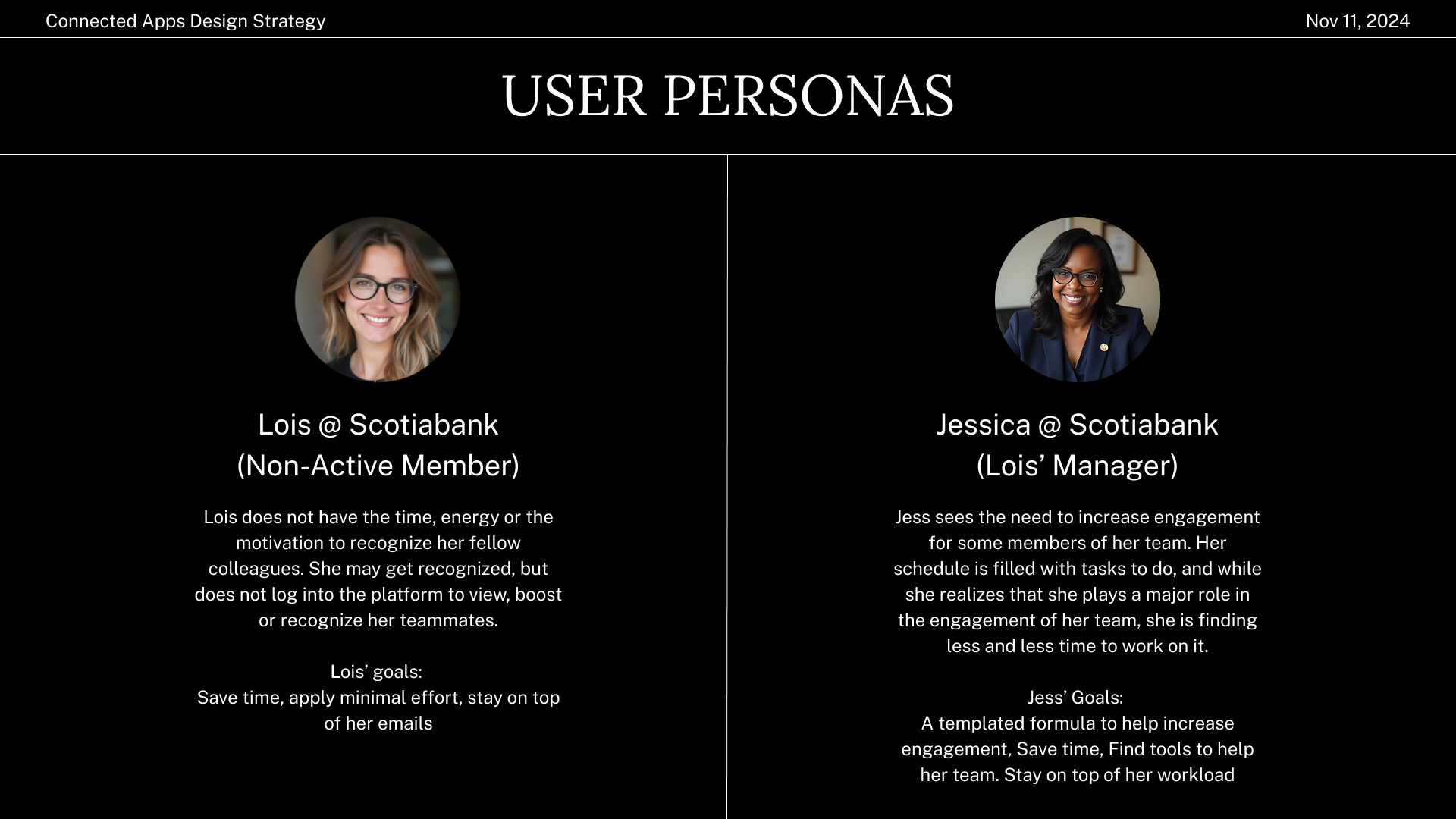
Result: We identified two key personas: Lois (disengaged employee) who rarely recognizes peers, and Jessica (manager) who directly drives team engagement.
User research was conducted with Microsoft Teams + Achievers integration users, leading to the development of two key personas. The manager was an important persona to include as they are the main driver of employee engagement.
Lois @ Scotiabank (Disengaged Program Member)
- Doesn’t feel motivated to recognize colleagues.
- Rarely logs into the Achievers platform to engage with recognitions.
- Goals: Save time, avoid friction, stay on top of emails.
Jessica @ Scotiabank (Manager)
- Aware of the need to boost team engagement.
- Struggles to prioritize it due to her busy schedule.
- Goals: Find lightweight, repeatable ways to improve team morale.
User Journey Mapping
My Role: I translated personas into journey maps to visualize friction points and engagement opportunities in Miro. By showing how recognition unfolded across touchpoints, I made abstract problems tangible and identified where design could have the biggest impact.
Result: Recognition flows had key drop-off points: awareness (users not noticing opportunities), action (too many steps to send recognition), and follow-up (no reinforcement loop).
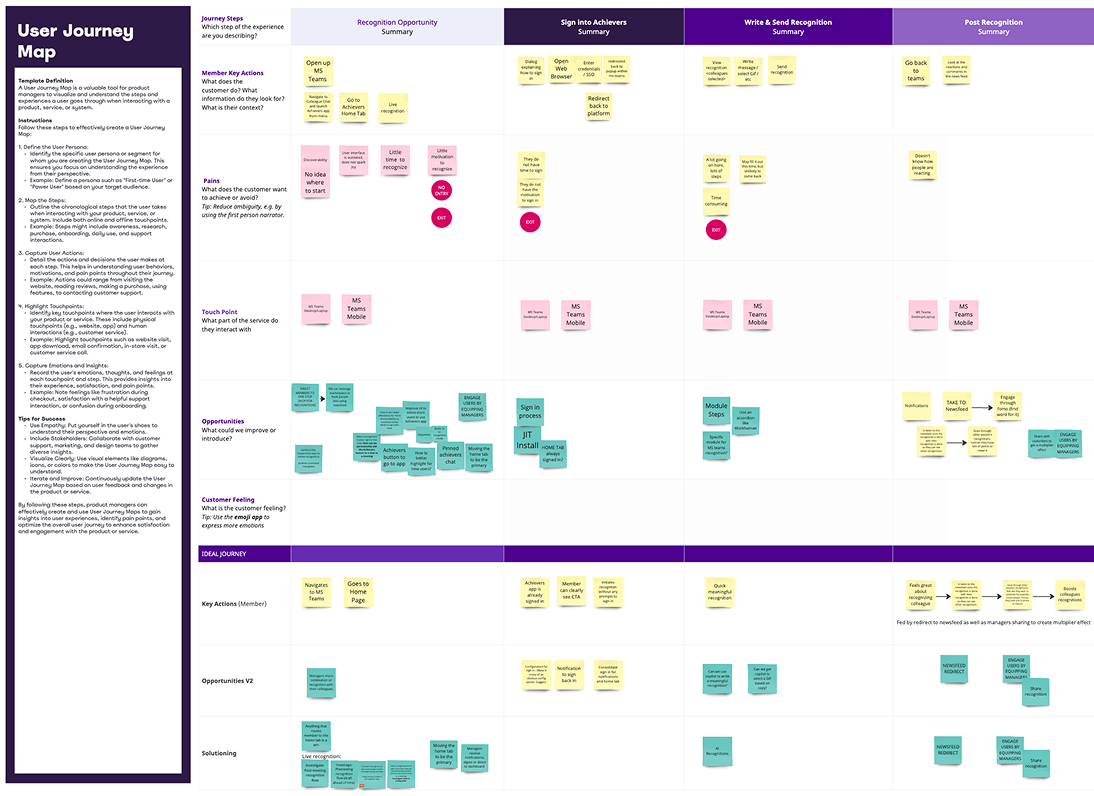
The red dots are the entry or exit points where we are losing many of our users due to friction, lack of discoverability, bad sign-in experience, etc. Below it we have the ideal journey mapped out and how a manager can contribute to them.
Mapping Lois' Journey:
1) Recognition Opportunity
2) Signing into Achievers / Adding App
3) Writing the Recognition / Selecting Value
4) Post Recognition
Pain Points:
- Poor discoverability
- Frustration with being signed out
- Too many steps to complete a recognition
- Lack of time or awareness to return and repeat behaviour
Mapping Jessica’s Role Loi's Journey:
Jessica can influence Lois’ behaviour. Key strategies:
- Equip managers to quickly engage with recognitions.
- Amplify recognition visibility through chat notifications.
- Integrate Manager’s Toolkit into chat apps.
- Enhance Live Recognition features for easy sharing and visibility.
Stakeholder Alignment on Personas
My Role: I facilitated alignment by reframing decisions in terms of effort vs. impact. This helped stakeholders see why prioritizing managers over disengaged users would yield higher returns, creating consensus around where to focus our first design efforts.
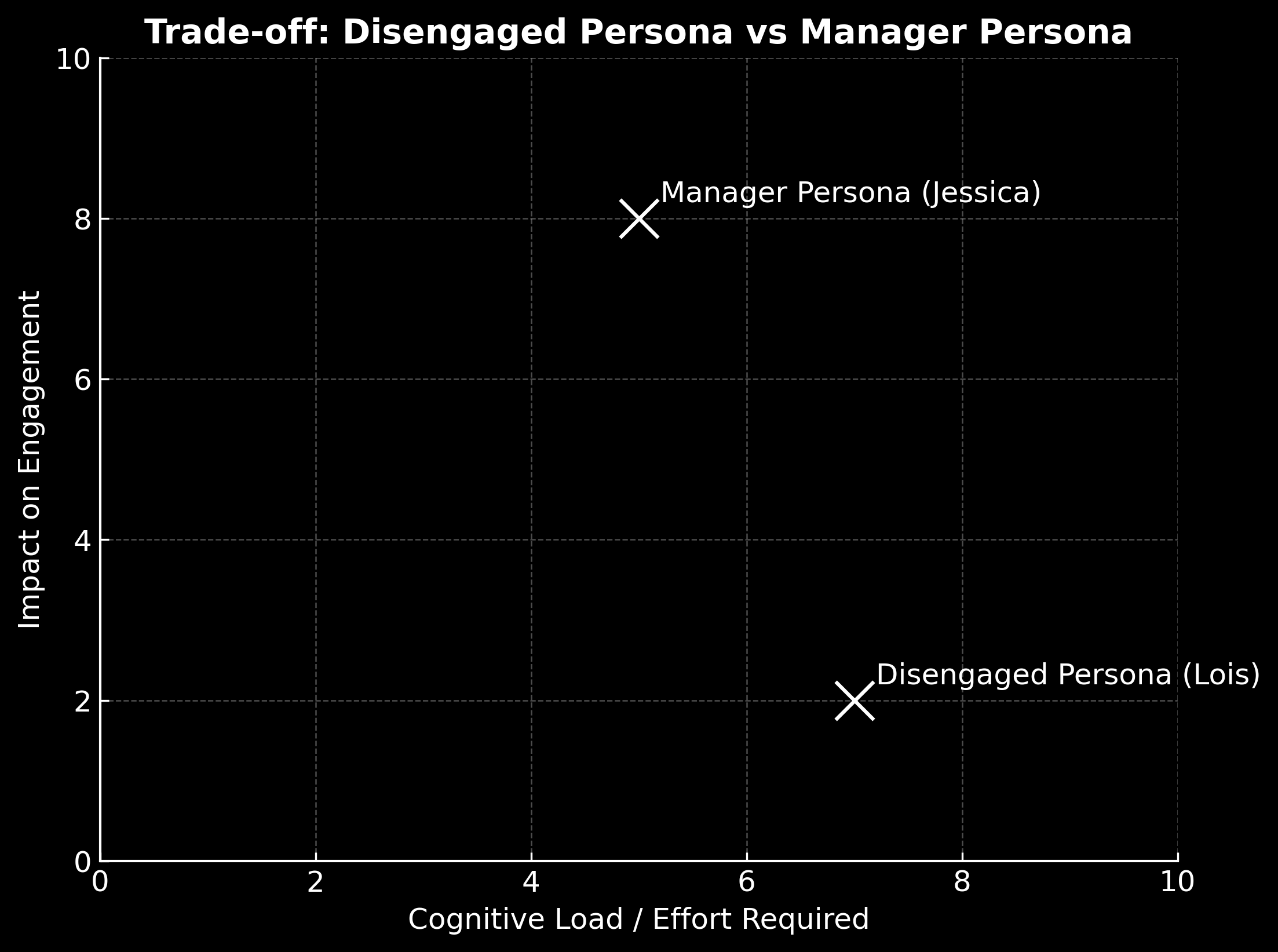
This diagram visualizes the trade-off we discovered between designing for disengaged users versus managers. On the X-axis, I plotted the effort required to see meaningful behaviour change. On the Y-axis, I plotted the impact on engagement.
When we mapped personas, it became clear that designing for disengaged users like Lois requires a lot of cognitive effort and mindset change (high effort, low impact). In contrast, designing for managers like Jessica requires less effort to influence and creates a much larger engagement impact across their teams (lower effort, higher impact).
This framing helped us align stakeholders around prioritizing managers first, since the return on investment is significantly higher.
Designing for disengaged users adds complexity without solving the root issue: Despite reducing all forms of friction, an increase in recognition requires a mindset shift in a disengaged user. Instead, we should prioritize managers, who directly drive engagement, by focusing on tools like the Manager Toolkit, automated digests, and proactive prompts to simplify their workflows and amplify team recognition.
Cross-Functional Alignment
My Role: By meeting regularly with key teams, my Product Manager and I kept our designs aligned with broader initiatives and avoided working in silos. These touchpoints also built trust and stronger stakeholder relationships.
These were the key teams involved in the success of this strategy:
Product & UX Design: Define vision, map journeys, prototype solutions.
Engineering: Enable MFE integration, resolve tech debt, optimize performance.
Communications: Support with naming, onboarding, and awareness campaigns.
Customer Success: Provide feedback on rollout efficacy and client adoption.
Data & Analytics: Define and track metrics for engagement and success.
Prioritization & Flow Design
My Role: I partnered with product to prioritize features using impact vs. effort trade-offs. Then I designed flows that accounted for different attention modes — active notifications, passive discovery, and follow-up reinforcement — ensuring end-to-end journeys felt complete.
Result: Flows were structured around Notice → Act → Follow-up, balancing active prompts (notifications) with passive discovery (tabs, digests).
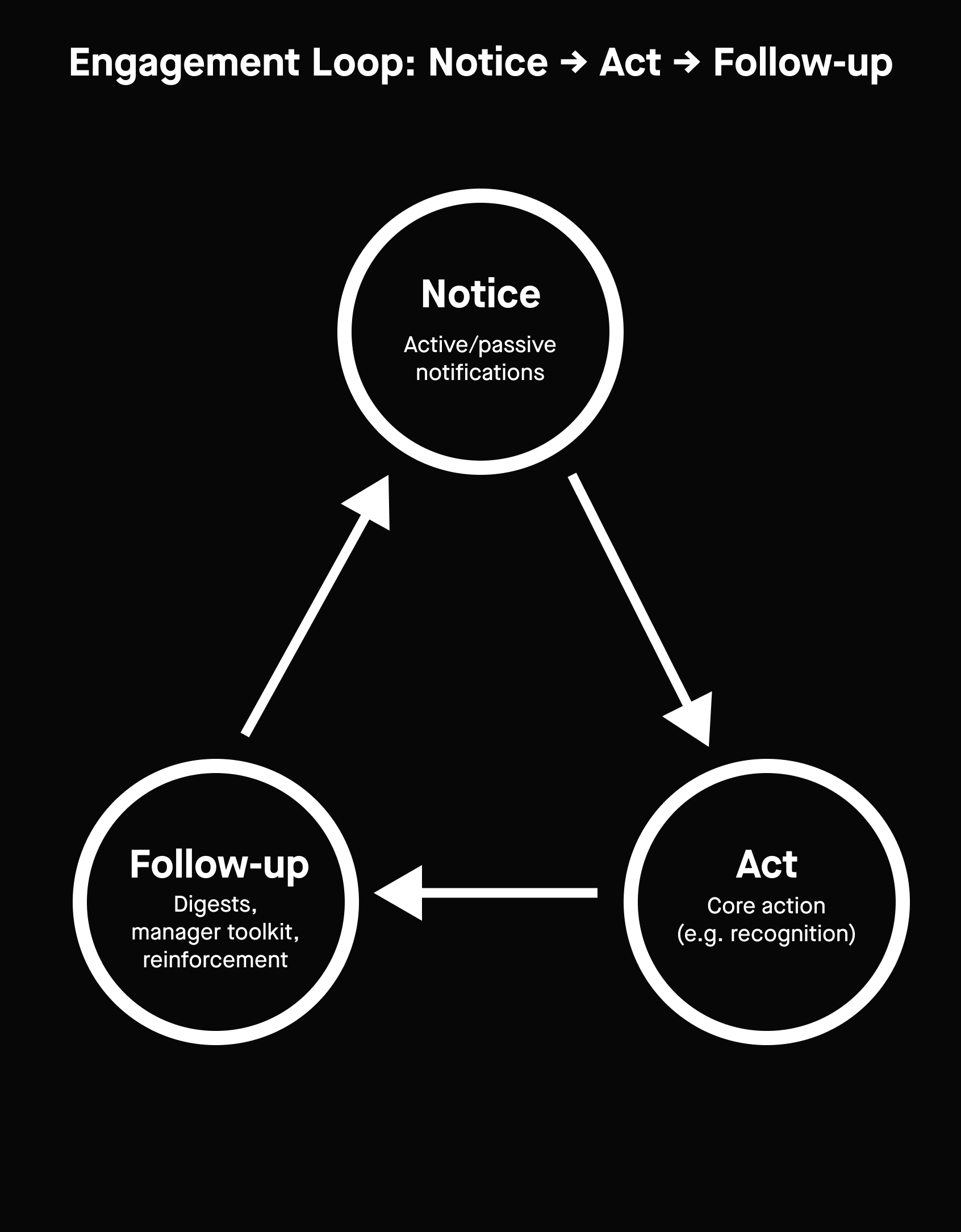
The Engagement Loop emphasizes repetition and habit-building.
We used feature prioritization to identify high-impact changes with the least complexity and designed for different attention modes:
- Active notifications (alerts, prompts)
- Passive notifications (non-intrusive discovery, e.g. Manager Toolkit tab)
We mapped our flow phases:
Notice → Act → Follow-up
Details:
We began phase two by deciding on what to build first and how to design the user journey from awareness, to action, to reinforcement—while balancing different types of notifications to avoid overload. These are different layers of the same design decision: how to guide user attention and behaviour inside a chat integration.
• First, we used feature prioritization to identify what high-impact features we can introduce. In this case, we chose Manager Toolkit as we could introduce it through an iFrame or through the MFE tech we can now leverage.
• Once we knew which features to focus on, we decided on how to deliver them without overwhelming the user. As in, should the recognition reminders be an active nudge or a passive discovery through a tab or digest. We determined both will provide value to the manager. The tab is where the toolkit will live, and the digest will help Jessica stay on top of her role (e.g. recognizing her team, commenting on existing recognitions, etc.)
• Finally, we zoom out and map when the interaction unfolds over time, ensuring the overall journey feels complete and drives repeat engagement (see Engagement Loop graphic).
• Notice → Act → Follow-up
Active or passive notifications are the “Notice” step → the core feature is the “Act” step → digests or manager toolkits support “Follow-up.”
– Notice triggers Act.
– Act creates value in the moment.
– Follow-up closes the loop and re-opens the door to another Notice — creating a cycle of ongoing engagement.
Metrics & Success Tracking
My Role: Finally, I collaborated with data science to define tracking anchors for key metrics. I ensured we measured both outcomes (recognition activity, manager actions) and experience quality (drop-off reduction, Time on task). This gave the team a balanced system to validate success and refine over time.
Result: Success metrics included recognition activity rate, drop-off reduction, manager engagement actions, and user satisfaction scores.
We worked closely with the Data Science team to set up tracking “anchors” for each key metric, ensuring behaviours could be measured accurately. Metrics balanced behavioural outcomes with experience quality:
- Recognition activity rate → tracked to measure whether the integration increased meaningful recognition.
- Drop-off reduction → monitored to confirm task flows became smoother and more intuitive.
- Manager engagement actions → instrumented to validate our focus on managers as the highest-leverage persona.
- User satisfaction (CSAT/NPS) → collected to capture perception of seamlessness and reliability.
- Adoption across platforms → tracked to confirm scalability beyond Microsoft Teams.
Result: Partnering with Data Science ensured each metric had clear instrumentation, giving us a holistic view of both impact and usability.
Conclusion and Impact
This project transformed chat integrations at Achievers from ad-hoc builds into a repeatable, research-driven strategy—aligning key teams, prioritizing high-impact features, and setting a foundation for scalable, AI-enabled experiences.
Through this strategy, we improved engagement on our Microsoft Teams integration. We led KPIs to increase recognition activity by 16% within chat, reduced drop-off in recognition flows by 23%, and grew manager-driven actions (like Live Recognitions and digest usage) by 30%.
Framework
Using our Microsoft Teams UX strategy as a guide, I've put together a framework that we can apply to all upcoming chat integrations.
Selected Work
GalileoEnd-to-End Design for Customer Facing Logistics App
Mixem Mobile AppEvents & Analytics UX/UI Design Case Study
PromysMobile and Web CRM Dashboard UI Redesign